In the blue corner
Safe Little Faces
Hide faces in photos, videos, and Live Photos on iPhone and iPad before sharing
Photography & video
An iPhone and iPad app that lets you cover faces, license plates, names, and other sensitive details in photos, videos, and Live Photos using on-device
About Safe Little Faces
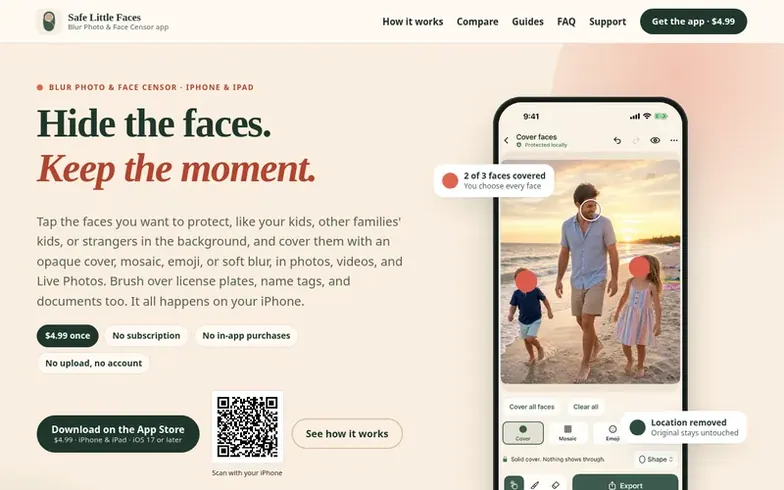
Safe Little Faces is an iPhone and iPad app for blurring faces, license plates, names, documents, and other sensitive details in photos, videos, and Live Photos before sharing. The app uses on-device face detection to find faces automatically, and you choose which ones to cover using one of four styles: opaque Privacy Cover, Mosaic, Emoji, or Soft Blur. For other details like license plates and names, you can brush over them or tap to add a cover. The app exports a new, protected copy without location data, camera details, or capture date metadata, while keeping your original photo untouched. Everything processes on your device with no upload, account, or tracking.
Where it stands out
- On-device face detection finds faces automatically in photos and every frame of videos
- Four cover styles: Privacy Cover, Mosaic, Emoji, and Soft Blur
- Brush tool to cover license plates, names, documents, and other details
- Video and Live Photo support with covers that follow people as they move
- Batch processing of up to 20 photos at once
- Final check before saving looks for visible faces, text, and license plates
- Export removes GPS location, camera details, and capture date metadata
- Works on iPhone and iPad with iOS/iPadOS 17 or later
Pricing
Pricing model: Paid
$4.99 one-time purchase (U.S. App Store)
Questions
- How much does Blur Photo & Face Censor cost?
- The app costs $4.99 once in the U.S. App Store with no subscription, in-app purchases, or ads. Every tool and full-resolution export is included, and Apple shows your local price before you buy.
- Can the app blur license plates, name tags, and documents?
- Yes. You can brush over or tap to add a cover to license plates, names, house numbers, screens, documents, and other details. The final check before saving points out readable text, number plates, and QR codes that are still showing.
- Does the app work on videos and Live Photos?
- Yes. You can choose a video or Live Photo and faces are found in every frame with covers that follow people as they move. You can pause and drag a cover to fix it, the covered copy keeps the sound, and your original is not changed.
- Does the app remove location data and metadata from photos?
- Yes. Every export is a newly encoded copy that does not include the original's GPS location, camera, lens, or device details. The capture date is also removed unless you turn on Keep date taken for photos, and your original is not changed.
- Is Safe Little Faces the same app as Blur Photo & Face Censor?
- Yes. Safe Little Faces is the website and brand; Blur Photo & Face Censor is the app's current App Store name (earlier listings used “Safe Little Faces: Face Blur”). Same developer, same app: App Store ID 6797679260 .
Safe Little Faces has a free listing. The owner can unlock the full profile with a paid launch for $5:
- Founder story (locked)
- Milestones (locked)
- Demo video (locked)
- Dofollow website link: not on this free listing (its website link is nofollow)