In the blue corner
QaviloPDF
Free online PDF tools to convert, merge, split, compress, edit, OCR, and secure documents directly in your browser
PDF tools
Browser-based PDF toolkit for converting documents, merging and splitting PDFs, compressing files, OCR-indexing, editing, and securing documents without
About QaviloPDF
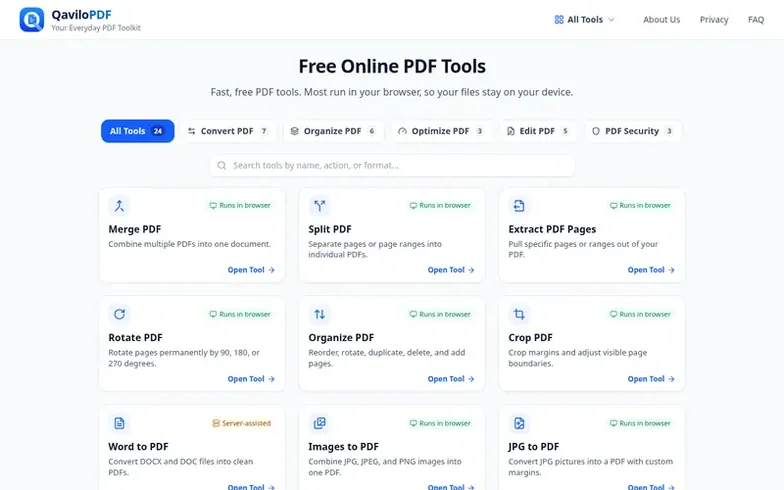
QaviloPDF is a free online collection of PDF utilities designed to make everyday document tasks fast, accessible, and privacy-respecting directly in modern web browsers. Users can convert Word, Excel, CSV, and image files into PDFs, or export PDF pages as JPG images. The toolkit allows users to merge, split, extract, rotate, crop, and rearrange PDF pages, as well as reduce file size or add searchable OCR text layers to scanned PDFs. Advanced features include modifying text, adding images, annotations, shapes, page numbers, watermarks, and signatures, plus encrypting PDFs with AES-256 passwords, unlocking protected files, or permanently redacting sensitive information.
Most document operations run directly in the browser using WebAssembly, Web Crypto, and Web Workers, so files stay on your device. Word-to-PDF conversion uses a server-assisted process with temporary files deleted immediately after conversion. No registration, user accounts, or paywalls are required to use the tools.
Where it stands out
- PDF compression and OCR indexing
- PDF editing with text, images, and annotations
- AES-256 password protection and PDF unlocking
Pricing
Pricing model: Free
QaviloPDF vs alternatives
Same attributes, side by side| Attribute | QaviloPDF |  File Maktab |
|---|---|---|
| Category | PDF tools | PDF tools |
| Stage | – | – |
| Founded | – | – |
| Based in | – | Jordan |
| DR | 0 | 0 |
| Community votes | 0 | 0 |
| Verified |
Questions
- What is QaviloPDF, and what can I do with it?
- QaviloPDF is an online document toolkit for converting Word, Excel, CSV, and JPG/PNG images to PDF, as well as merging, splitting, compressing, OCR-indexing, editing, comparing, redacting, signing, and protecting PDFs directly in your browser without desktop software.
- Are my documents uploaded to a server?
- All PDF merging, splitting, compression, OCR, editing, redaction, comparison, encryption, image, and spreadsheet tools process files locally in your browser without uploading document bytes. Only Word to PDF conversion runs in an isolated server worker using temporary IPC spool files deleted immediately after conversion and a bounded 90-second in-memory retry cache with no permanent storage.
- Is QaviloPDF free to use?
- Yes. QaviloPDF provides free access with no paywalls, watermarks, or hourly task throttles. Standard safety limits apply per tool, such as 50 MB per PDF on single-file tools, up to 20 files (150 MB total) in Merge PDF, and 15 MB per file (20-file batch) for Word to PDF.
- Do I need to create an account or install software?
- No. You can use all QaviloPDF document tools and converters directly in a modern desktop or mobile browser without creating an account, registering an email, or installing desktop software.
- Does QaviloPDF work on mobile phones and computers?
- Yes. Every QaviloPDF tool works across modern desktop and mobile browsers. For large PDFs, multi-page OCR, or dense spreadsheets, a desktop browser with higher available RAM is recommended.
QaviloPDF has a free listing. The owner can unlock the full profile with a paid launch for $5:
- Founder story (locked)
- Milestones (locked)
- Demo video (locked)
- Dofollow website link: not on this free listing (its website link is nofollow)