
In the blue corner
Octomerge
An agent workspace in the cloud for configuring and running agents on any connected machine with your choice of models
AI agents
Octomerge is a cloud agent workspace that lets you configure agents once and run them on any connected machine, using models from multiple providers in a single
About Octomerge
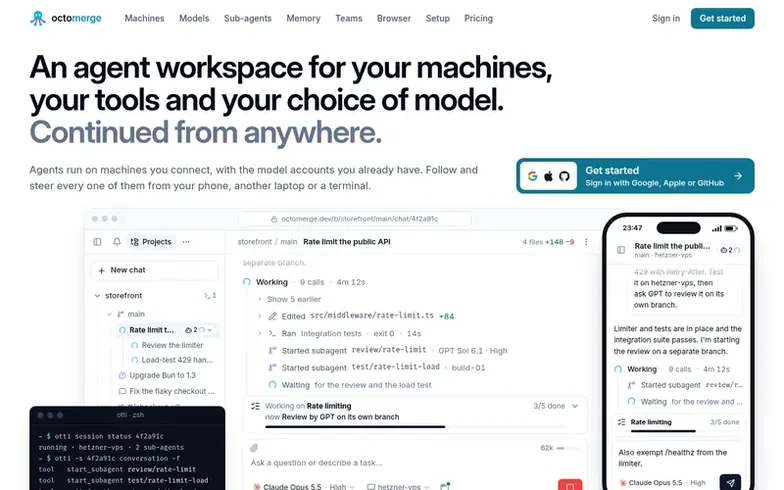
Octomerge is a cloud-based agent workspace that enables teams to configure AI agents once and run them across multiple machines. Agents operate with model accounts you already have, mixing providers from different companies within a single conversation. You can follow and steer agents from any device—phone, laptop, or terminal.
The platform eliminates machine-specific configuration drift by keeping setup centralized in your account. When you connect a new worker, it automatically receives all configuration, secrets, and git access. Sub-agents can work on their own git branches and be merged back using standard git operations, with worktrees syncing across all connected workers.
Agents can read previous work and conversations stored in SQLite sessions that sync to your workspace. You can start sessions directly from GitHub issues using the /otti command, and the platform integrates with issue trackers to show session status. Teams can share sessions and projects, with each participant able to follow live progress or point their own agent at a teammate's work.
Octomerge provides coordination and handles the workspace, while you retain execution control, model access, and all data ownership.
Where it stands out
- Support for multiple models from different providers in one conversation
- Agent configuration synced across all connected machines
- Sub-agents on separate git branches with automatic merging
- Real-time session monitoring from any device
- GitHub integration with /otti commands for issue automation
- Persistent memory and conversation history synced to workspace
- Team session sharing and collaborative viewing
- Isolated browser session for each agent with site authentication
- Effort levels for model-specific performance settings
- Secret and credential management for agents and workers
Pricing
Pricing model: Freemium
Standard plan with 7-day free trial, Pro plan, Team plan (billed per member), Enterprise plan. Prices in US dollars. Renewal monthly or yearly. 14-day money-back guarantee after first payment.
Octomerge vs alternatives
Same attributes, side by side AiXenix
 OfferSwap
Questions
- What models does Octomerge support?
- Octomerge runs no models of its own. You connect API keys or OpenAI-compatible endpoints such as Open LLM Router. Agents list the same models and pick one for each sub-agent. Each model takes the efforts its provider offers. The platform supports mixing providers in one conversation.
- How does agent configuration work across different machines?
- Octomerge keeps agent setup in your account, and every worker you connect automatically gets all of it. When you add a new machine, it arrives ready with the same configuration, secrets, git access, MCP servers, memory notes and worktrees. This eliminates configuration drift between machines.
- Can team members collaborate on agent sessions?
- Yes. You can share a session, branch or entire project with your team. Teammates find it in their own project under the branch and pull request, and read it as it runs. Each session has one driver; everyone else follows. Others can copy the link into their own session to point their agent at the shared work.
- How do you start an agent from a GitHub issue?
- Comment /otti implement on a GitHub issue or /otti work on a pull request. The Octomerge GitHub App replies with a launch link that opens Octomerge's dialog with the repository, a branch such as issue/412-retry-failed-webhooks, the issue as a work item and a first message. Nothing starts until you confirm.
- What happens if my subscription plan ends?
- When a plan ends, agents take no new messages or tasks. An agent that is working at that moment finishes its current response. You can cancel at any time and your plan keeps working until the end of the period you paid for. If you are unsatisfied, you can email contact@octomerge.dev within 14 days of your first payment for a full refund.
Octomerge has a free listing. The owner can unlock the full profile with a paid launch for $5:
- Founder story (locked)
- Milestones (locked)
- Demo video (locked)
- Dofollow website link: not on this free listing (its website link is nofollow)