
In the blue corner
EasyTyping
Free touch typing practice in your browser
Education & Learning
A free browser-based typing practice tool that teaches key positions and finger placement through guided lessons with progress tracking.
About EasyTyping
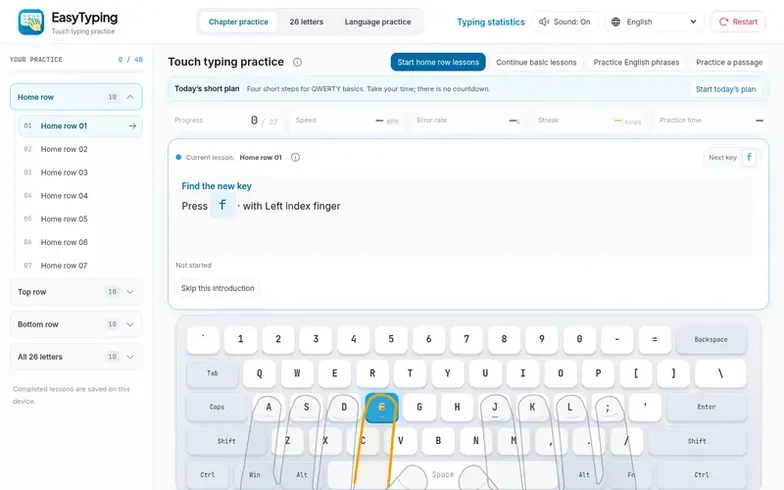
EasyTyping is a free typing practice tool that helps learners develop proper finger placement and touch typing skills. It offers guided lessons starting with the home row, then progressing through upper and lower rows, with on-screen finger guides and keyboard hints that users can adjust based on their skill level.
The platform supports multiple keyboard layouts including English QWERTY, Indonesian QWERTY, Chinese pinyin, Japanese romaji, Vietnamese Telex, and Hindi InScript. Users can practice with pre-set lessons or English passages, and track their speed in words per minute and accuracy rate.
Progress is saved locally in the browser with no account required. The platform includes a four-step daily plan for structured learning and allows users to review target-key errors to improve weak areas.
Where it stands out
- Home row, top row, and bottom row lessons
- On-screen finger guides and keyboard hints
- Speed and accuracy tracking
- Four-step daily practice plan
- English passage practice
- Multiple keyboard layouts
- Local progress saving in browser
- Target key error review
- Adjustable hint levels
- Six interface languages
Pricing
Pricing model: Free
EasyTyping vs alternatives
Same attributes, side by side| Attribute | EasyTyping |  SignUpSnap |  Spot the Cue |  Orbis: Learn Geopolitics & History |
|---|---|---|---|---|
| Category | Education & Learning | Education & Learning | Education & Learning | Education & Learning |
| Stage | – | – | – | – |
| Founded | – | – | – | – |
| Based in | – | United States | – | Estonia |
| DR | 9 | 12 | 7 | 7 |
| Community votes | 0 | 0 | 0 | 0 |
| Verified |
Questions
- Is EasyTyping free, and do I need an account?
- The lessons are free to use in your browser with no account or installation required to start practicing.
- Where should my fingers rest for touch typing?
- On a QWERTY keyboard, rest your left fingers on A, S, D and F and your right fingers on J, K, L and semicolon, using the raised marks on F and J to find your position.
- Does clearing browser data erase my progress?
- Yes. Completed lessons, daily plans, statistics and key-review records are stored locally, and clearing site data removes them. There is no account recovery, cloud sync or export feature.
- How are accuracy and error rate calculated?
- Accuracy is correct key attempts divided by all scored attempts, while error rate is incorrect attempts divided by the same total. For example, 90 correct attempts and 10 mistakes gives 90% accuracy and 10% error rate.
- Can I continue another day?
- Completed lessons and practice statistics stay in your browser and you can continue basic lessons to open the first unfinished foundation lesson. However, your records do not sync across devices.
EasyTyping has a free listing. The owner can unlock the full profile with a paid launch for $5:
- Founder story (locked)
- Milestones (locked)
- Demo video (locked)
- Dofollow website link (locked)